Patocka Steely
@patockasteely
I would recommend FlowLabs to everyone looking to spend less time on the charts and automate their trading. It changed my trading completely for better and I'm thankful for the tools provided by FlowLabs
Pick your entry model, stack your filters, set your stop, target and risk. When your exact setup forms, the alert fires with the contracts already calculated. No coding.
Four steps from your model to a setup you can trade or automate.
Breaker Block, CISD, IFVG, Suspension Block, MSS + FVG or Order Block. Only that model's settings show up.
HTF orderflow, HTF FVG, liquidity sweep, killzone, premium/discount. A setup only fires when every filter you switched on agrees.
Entry, stop, target at the next untaken liquidity, and contracts from your risk per trade.
One alert per setup. 8 plots feed Strategy Builder if you want to build your own strategy.
Pick the model you trade. Switch it any time.
Each model runs the same engine as my TradingView indicator, so it prints the same signals. I checked every one bar by bar against TradingView data before it shipped.
All filters ship off. Switch on the ones you trade with.
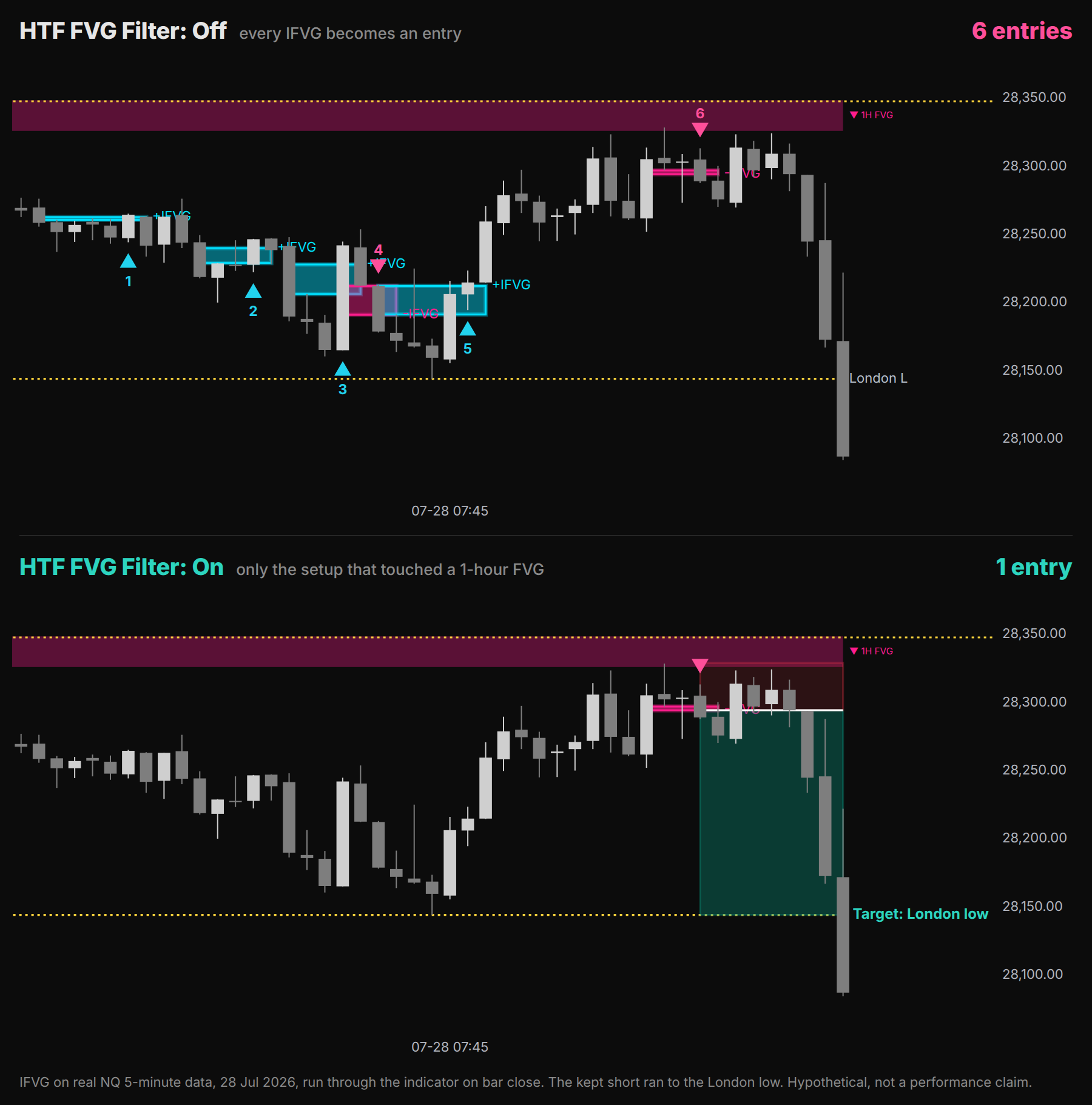
Same chart, same day. Without a filter my IFVG model printed 6 entries. With the HTF FVG filter on, only the one that touched a 1-hour FVG was left - and that one ran to the London low. A setup that fails a filter never becomes a setup: no alert, no trade plan, no plot.
Switch the trade plan on and every setup gets one. The plan is final when the bar closes.
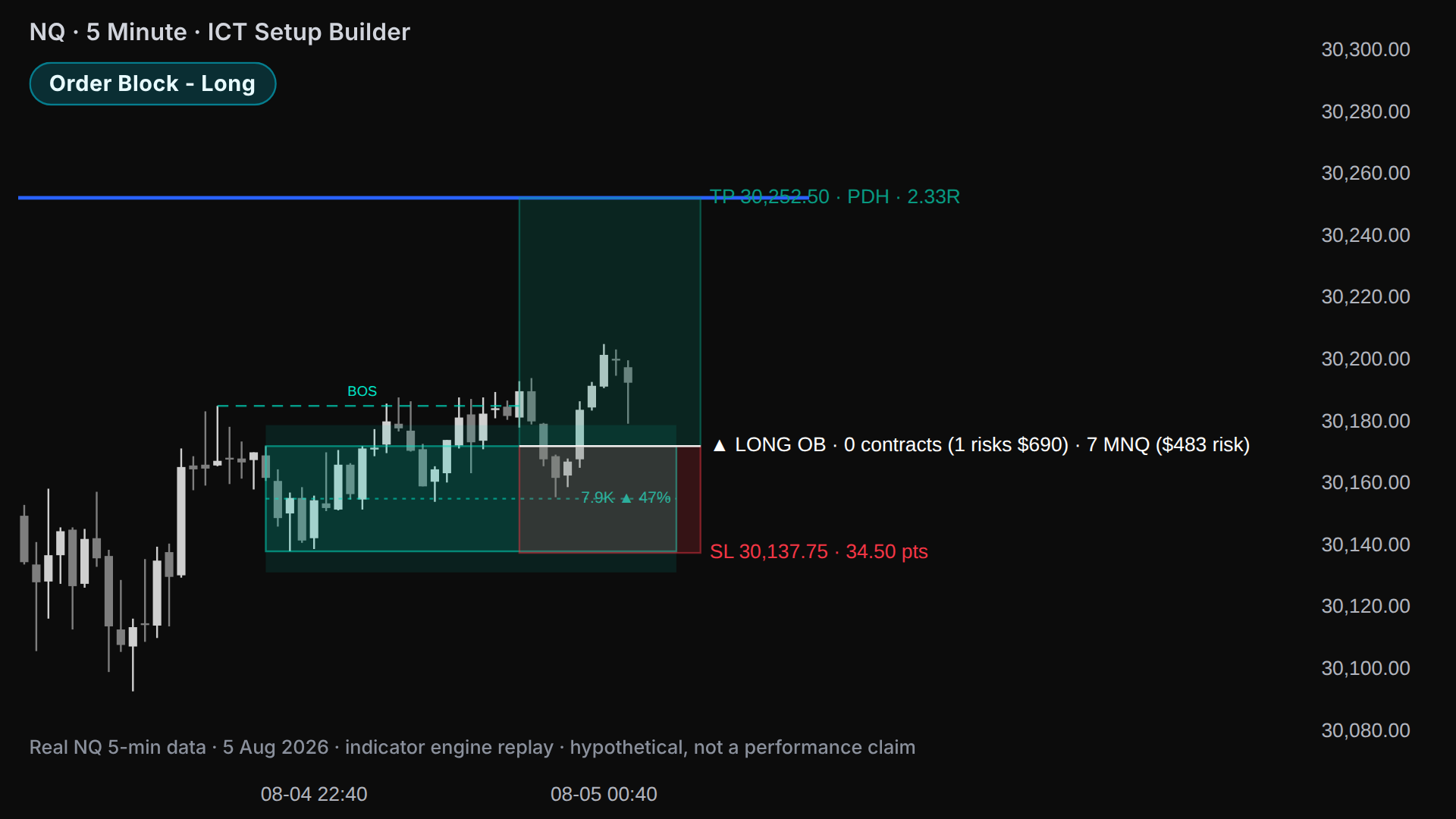
At the signal close, the zone edge or the 50% of the zone.
Beyond the swing or beyond the zone, plus your buffer in ticks.
The next untaken liquidity - PDH/PDL, PWH/PWL, session highs and lows, HTF swings. Or a fixed R:R.
Contracts from your risk per trade. 1 contract risks too much? On NQ, ES, YM, RTY, GC and CL it shows how many micros fit.
Nothing trades unless you set it up.
One alert per setup, with the whole plan in it. Send it to your phone through NinjaTrader's share services. Want it automated? 8 plots feed Strategy Builder: long and short setup, entry, stop, target and contracts. You build the strategy from your own rules.
Every filter you chose agrees
Entry, stop, target and size in it
Built in Strategy Builder, by you
FlowLabs never places trades. On a prop firm account, check their automation rules first.
A setup only prints when your filters agree
Contracts come from your risk per trade
Closed bars only. A signal is final at the close
8 plots for Strategy Builder, no code needed
Every rule running is one you chose
The IB from 9:30 to 10:30 New York time, plus the confluences that help you understand the range. Levels and VWAP run until 13:00.
High, low, 50%, 25% and 75% of the first hour.
The IB volume profile with POC, VAH and VAL.
Tracks the order of the IB high and low on NQ, ES and YM. NQ's order differs? At the IB close it prints an SMT label and fires an alert.
Anchored at the 9:30 open.
Low first and price above the 50%? It projects the HIGH. High first and below the 50%? The LOW.
Only inside your signal window, 10:15 to the IB close by default. One buy and one sell per day max.
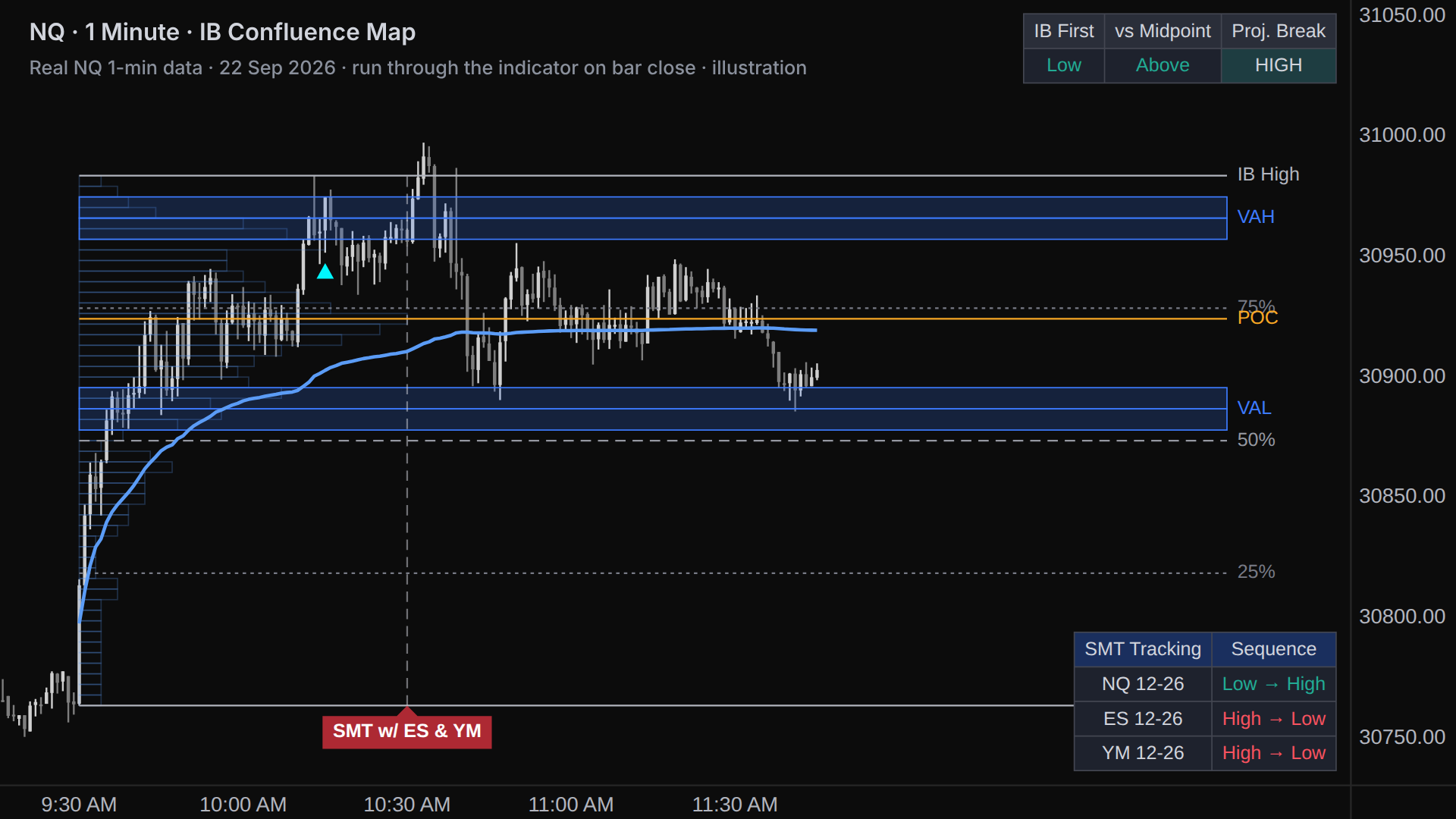
The IB low forms first
The table reads Low in the IB First column.
Price pulls back to the 75%
Inside the signal window, 10:15 to the IB close by default.
A close above VWAP
The buy prints on that bar's close. A sell is the mirror.
Calculated on bar close, so nothing repaints. 4 plots feed Strategy Builder: AVWAP, Buy Signal, Sell Signal and SMT Divergence.
Start 7-Day Free TrialReal reviews from the FlowLabs Whop.
I would recommend FlowLabs to everyone looking to spend less time on the charts and automate their trading. It changed my trading completely for better and I'm thankful for the tools provided by FlowLabs
I am much more confident in my strategies since I can properly test them with tools FlowLabs provide. And automated trading is a real game-changer for me, owner of FlowLabs helped me with setting up everything for automation and taught me how to test strategies properly.
These tools helped me spend less time on the charts while being more consistent than ever. Worth every dime.
Two NinjaTrader 8 tools, priced separately. Both start with a 7-day free trial.
7-day free trial
$20 off every month, forever - $59.99 instead of $79.99.
First 100 users. Enter the code at checkout.
7-day free trial
NinjaTrader 8 desktop on Windows. On a Mac they run through Parallels or a Windows VPS. The IB Confluence Map is made for NQ and MNQ on 1 to 15 minute charts, and your data feed needs ES and YM for the SMT.
No. Everything is calculated on closed bars. A signal is final once the bar closes, and a reloaded chart shows exactly what you saw live.
Yes. Each one runs the same engine as its TradingView version and was checked bar by bar against TradingView data - the IB Confluence Map with 0 differences over 157,186 bars of NQ. The ICT Setup Builder leaves out only the HTF EMA bias filter. Your NinjaTrader data feed can differ a little from TradingView's, so levels can too.
Yes, yourself. The ICT Setup Builder feeds 8 plots to NinjaTrader's Strategy Builder: long and short setup, entry, stop, target and contracts. The IB Confluence Map feeds 4: AVWAP, Buy Signal, Sell Signal and SMT Divergence. FlowLabs never places trades. On a prop firm account, check their automation rules first.
Download the zip and copy your license key from your Whop purchase. In NinjaTrader go to Control Center, Tools, Import, NinjaScript Add-On. Add the indicator from the FlowLabs folder in the Indicators window, paste your key into License Key and press OK.
2 per license key. Switching PCs? Reset your key on your Whop purchase.
The prices are real NQ data. The videos replay that data bar by bar through each indicator's own engine - the same code that runs inside NinjaTrader. They are not screen recordings, and the trade plans in them are hypothetical.
Every plan starts with a 7-day free trial. After that, all sales are final once access is granted. Cancel auto-renew any time before renewal in your Whop account; no prorations. Third-party services (NinjaTrader, data feeds, brokers) are separate and non-refundable. If access fails post-purchase, contact support within 72 hours.
Educational only; not financial advice. No earnings or performance guarantee. Trade plans and chart examples are hypothetical; live results can differ due to execution factors. Not affiliated with The Inner Circle Trader.
Silver Bullet, OTE and Session Raid on every entry model, plus the Optimizer. Years of data in seconds.